

IT setup guide to plan networks, hardware, cybersecurity, cloud systems,...

Office Network Infrastructure Setup and Upgrade: Components, Requirements, and a Step-by-Step Checklist
A US-based technology firm signs a lease for 60 seats on Bengaluru’s Outer Ring Road, with a hard go-live date 90 days out and a delivery team already being hired against it. Three weeks in, the site survey comes back with a problem: the existing cabling in the fit-out is a mix of Cat5e and unlabelled runs that will not certify, the building’s internet leased line takes six weeks to provision, and the operations lead now has a vendor proposal full of line items, managed switches, PoE budgets, VLAN segmentation, that nobody on the call can evaluate. This is the moment most people start searching for an office network infrastructure setup guide, and it is usually the moment the timeline is already at risk.
The business consequence of getting this wrong is not abstract. A network that is not ready means the office cannot open on schedule. An upgrade run during business hours without sequencing means downtime across a live team. A flat network with no segmentation means guest traffic and corporate systems share the same broadcast domain. And a switch or circuit sized by guesswork means either an outage on day one or an over-provisioned setup that costs far more than the office needed.
This guide is written for the people who own that outcome: IT managers delivering a working office before move-in, operations leaders briefing a vendor for the first time, facilities managers planning an upgrade, and GCC or ODC setup leads standing up a delivery centre. It covers what the setup involves, the components and how to size them, a 50-point phased checklist you can hand to a vendor, an upgrade checklist, the data centre and NetOps view for larger sites, and the India-specific realities that generic guides never mention. The editorial spine throughout is simple: a checklist is only useful if it is sized correctly for the team, sequenced to avoid downtime, and adapted to the physical and regulatory realities of the specific building and city.
What Office Network Infrastructure Setup Involves and What It Is Not
Office network infrastructure setup is the design, installation, configuration, and testing of the physical and logical systems that move data inside an office and connect it to the internet. It covers structured cabling, the network rack, switches and routing, wireless, internet connectivity, power protection, and security configuration. It is the foundation layer that every application, device, and user depends on.
It is not the same as general IT setup, a managed services contract, an IT support arrangement, or the office fit-out. The fit-out delivers walls, power points, and furniture. IT support keeps users productive after the office is live. Managed services is an ongoing operational model. Network infrastructure setup is the one-time engineering project that makes the office connectable in the first place, and it has to be sequenced alongside the fit-out, not after it.
What makes it distinct is the specific stack it delivers: physical cabling to every desk and access point, active networking equipment that switches and routes traffic, a wireless architecture sized for the floor, internet connectivity with failover, power infrastructure that keeps the network alive through outages, and a security configuration that segments and protects traffic. Each of these has sizing decisions that generic checklists skip, and those decisions are where projects succeed or fail.
How to Set Up Office Network Infrastructure in 7 Steps
Setting up office network infrastructure follows seven steps: survey and document requirements, design the network, secure connectivity and approvals early, install cabling and the rack, configure active equipment, activate and test connectivity, then document and hand over. Sequencing matters more than any single component, because the longest lead items are the internet circuit and building approvals.
- Survey the site and document requirements: headcount with growth projection, seat plan, device and application mix, bandwidth need, and power load.
- Design the network: cabling standard, rack location, switch and access point counts, VLAN plan, IP schema, and the internet and failover design.
- Secure connectivity and approvals first: order the primary and secondary internet circuits, apply for the sanctioned power load, and get building management approval for cabling and riser access.
- Install structured cabling and the rack: cable every desk and access point, terminate and label, fit the patch panels, PDU, and UPS.
- Configure active equipment: switches, router, firewall, VLANs, wireless, and VPN.
- Activate connectivity and test: circuit activation, failover testing, Wi-Fi coverage and throughput, and security validation.
- Document and hand over: as-built diagram, IP schema, equipment inventory, credentials, and a monitoring baseline.
If you want a broader operational view that extends beyond the network into the full office IT stack, this complete IT infrastructure setup checklist covers endpoints, servers, and software alongside the network layer.
The Four Main Components of ICT Infrastructure in a Modern Office
The four main components of ICT infrastructure in a modern office are: networking (switches, routers, cabling), hardware (servers, endpoints, UPS), software (network management, security, monitoring tools), and security systems (firewalls, access controls, endpoint protection). These four layers work together, and under-specifying any one of them is the most common cause of a setup that works on day one but fails under real load.
Networking is the layer that carries traffic: structured cabling, switches, routers, and wireless. For 10 to 50 users, a single managed access switch with adequate PoE and a business-grade router or firewall is usually sufficient. For 50 to 200 users, you move to multiple access switches with an aggregation or core layer and controller-managed wireless. For 200 or more, redundant core switching and link aggregation become the baseline. The most common mistake is buying switch port count without checking the PoE power budget against the devices that will draw from it.
Hardware covers servers, endpoints, network appliances, and the UPS that protects them. Many offices now run cloud-first with few or no on-premise servers, which reduces the rack load but does not remove it, the rack still holds switches, the firewall, the optical network terminal, and the UPS. Under-specification here usually shows up as a UPS sized only for graceful shutdown when the office actually needs ride-through until a generator starts.
Software is the management, security, and monitoring layer: the wireless controller, firewall and endpoint security consoles, IP address management, and network monitoring. The frequent gap is buying capable hardware and never deploying monitoring, so the team has no baseline and no alerting when something degrades.
Security systems span the firewall, intrusion prevention, network access control, VPN, and endpoint protection. The under-specification pattern is a flat network with a single perimeter firewall and no internal segmentation, which means a compromised guest device or printer sits on the same network as finance systems.
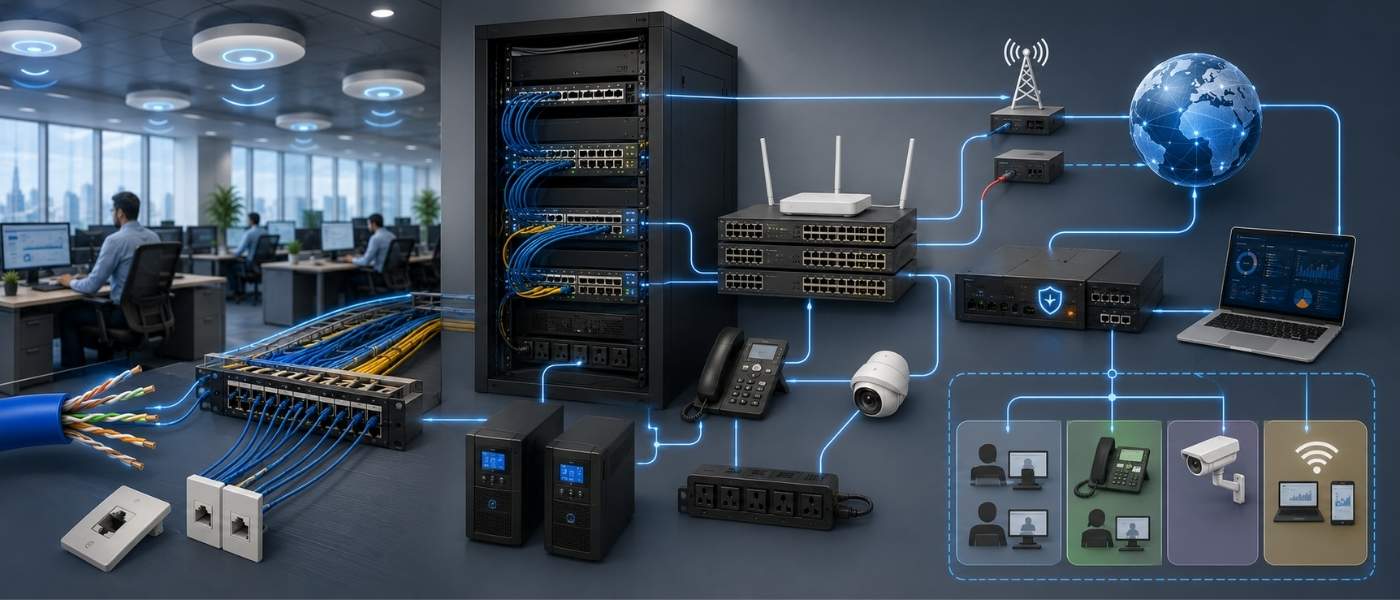
Office Network Infrastructure Setup: Component-Level Breakdown
This is the layer where sizing decisions are made, and where this guide goes deeper than a generic component list. Each item below includes the operational detail that determines whether the setup holds up.
Structured cabling: Cat6 vs Cat6A and when each applies
Cat6 supports 1 Gbps to the full 100-metre channel and 10 Gbps only to roughly 37 to 55 metres, while Cat6A supports 10 Gbps across the full 100 metres. Under the TIA-568 and ISO/IEC 11801 standards, the practical rule is to use Cat6A for new builds, backbone and uplink runs, and any cabling feeding high-density Wi-Fi 6E or Wi-Fi 7 access points, and to use Cat6 only where 1 Gbps to the desk is sufficient and budget is tight. Cat6A is thicker and needs a larger bend radius, so confirm conduit and tray capacity before specifying it, particularly in older Indian buildings where riser space is limited.
Terminate to a consistent T568B scheme, land every run on a patch panel, label both ends, and certify every link with a tester so you have documented proof the cabling will carry the speeds you designed for.
Network rack setup
Size the rack for current equipment plus growth, typically a 9U to 24U wall or floor rack for a small to mid office. Plan patch panel density to match your drop count, fit horizontal and vertical cable managers, and add a managed PDU. Cooling matters in the Indian climate: a rack in an unventilated room will run hot, so place it in a cooled, secure space and keep airflow clear.
Switching and routing
Choose managed switches for any office that needs VLANs, QoS, or monitoring, which in practice means almost every office above ten people. Size PoE carefully: a 48-port switch does not deliver 30 watts on every port at once, it works to a total power budget. Add up your actual device draw, Wi-Fi 6 access points at roughly 15 to 30 watts each, IP phones at 5 to 13 watts, cameras at 7 to 15 watts, then add 20 to 30 percent headroom, and match that to the switch’s PoE budget rather than its port count. Configure routing for a multi-ISP edge so the office can fail over between circuits.
Wi-Fi architecture
Plan access point density on both coverage and capacity. A reasonable planning figure is one access point per 1,500 to 2,000 square feet or per 20 to 30 concurrent users, denser for all-wireless offices where each person carries a laptop and a phone. A 50-person floor of around 5,000 to 7,000 square feet typically needs four to six access points. Use controller-based or cloud-managed Wi-Fi for central control, plan channels to avoid co-channel interference, and isolate the guest network from corporate traffic.
Internet connectivity
For a business or delivery office, specify a dedicated internet leased line with a symmetric, one-to-one bandwidth and a contracted SLA, not a shared broadband plan. Size it at roughly 5 to 10 Mbps per concurrent user for general cloud work and 10 to 20 Mbps or more for video-heavy or engineering workloads, then add headroom. Add a second ISP on a different last mile, ideally fiber from another provider or a 5G fixed-wireless link, and configure automatic failover.
UPS and power backup
Size the UPS to the rack’s connected load, including the full PoE draw of your switches, then choose runtime based on how long you need to ride through. A network-only rack drawing 500 to 1,000 watts is commonly protected by a 2 to 3 kVA UPS. In Indian cities where power cuts still occur in certain buildings, pair the UPS with the building’s diesel generator: the UPS covers the seconds until the generator takes over, the generator covers the longer outage. Add power conditioning where supply quality varies.
Firewall and network security
Deploy a next-generation firewall sized for your user count, with intrusion prevention, content filtering, and logging enabled. Configure a VPN for remote access and any site-to-site links. Implement network access control so unknown devices cannot join freely, and keep the firewall rule base documented and reviewed.
Network monitoring and documentation
Set a performance baseline at handover, deploy monitoring with alerting, and produce an as-built network diagram. Documentation is the difference between a network you can support and one you cannot: IP schema, VLAN map, rack elevation, credentials, and a change log.
VLAN segmentation deserves a clear threshold. Always separate guest from corporate, even at ten users. As you grow, add VLANs for voice, management, and IoT or security devices, so that by roughly 25 to 50 users you typically run at least four segments: corporate data, voice, guest, and management. Segmentation is driven by device classes and security need, not just headcount.
IT Infrastructure Setup for New Office in India: City-Specific Considerations
IT infrastructure setup for a new office in India varies meaningfully by city and micro-market: fiber availability, power reliability, building grade, and approval timelines differ across Bengaluru, Hyderabad, Gurugram, and Pune. Foreign companies are most often caught out not by the technology but by the lead times, building management approvals, internet provisioning, and power load sanctions, which run longer than Western equivalents.
Premium space is tight, which affects building choice. According to Cushman & Wakefield, India’s office vacancy fell to 13.85 percent in the first quarter of 2026, the first time below 14 percent since 2020, and in Bengaluru citywide vacancy declined to 7.8 percent, with some Bengaluru micro-markets as low as 2 percent. The practical effect is that you may not get your first-choice building, so confirm internet and cabling readiness for whatever space you can secure.
Bengaluru: the densest corridors are Outer Ring Road from Marathahalli to Sarjapur, Electronic City, Whitefield, and the Manyata and Hebbal belt in the north. Grade-A parks here usually offer several internet leased line providers in the building, while older standalone stock varies. Power is supplied by BESCOM and is generally steadier inside organised parks. Bengaluru’s GCC depth is the reason it dominates new setups: per Zinnov and NASSCOM, Bengaluru hosts more than 880 GCCs.
Hyderabad: the connectivity landscape centres on HITEC City, Madhapur, Gachibowli, the Financial District at Nanakramguda, and Kokapet. Buildings tend to be newer Grade-A, power on the IT corridor is generally reliable, and fiber availability is strong. Hyderabad has built fast: the city hosts more than 355 GCCs, and Cushman & Wakefield records it among the leaders in office rental growth.
Gurugram: the core micro-markets are DLF Cyber City and Cyber Hub, Sector 44, Golf Course Road and its extension, Udyog Vihar, and Sohna Road. NCR power supply has historically been more variable, so diesel generator backup and a well-sized UPS are not optional. Confirm the building’s generator capacity and power backup SLA, and check fiber entry rights, which are usually well served inside organised DLF and similar developments.
Pune: the IT clusters are Hinjewadi across its three phases, Magarpatta, Kharadi including EON IT Park, and the Baner and Balewadi belt. Hinjewadi has historically faced traffic and occasional infrastructure constraints, MSEDCL supplies power, and fiber is available inside the parks. Plan circuit and approval timelines with the same buffer you would apply elsewhere.
The India-specific items that catch foreign companies off guard are consistent across all four cities. Building management committee approval for cabling, riser, and shaft access can take one to three weeks and must be started early. Internet leased line provisioning commonly runs two to eight weeks, and longer if last-mile fiber needs to be built into the building. Right-of-way and a building NOC are often needed for fiber entry. And you must apply for an adequate sanctioned electrical load covering IT, UPS, and HVAC, which is a separate process from signing the lease. India’s wired broadband market is also concentrated: per TRAI, the top five providers account for about 98.6 percent of broadband subscribers, against a wired base of roughly 45 million, so real ISP choice comes down to which providers are already lit in your specific building.
If you are coordinating this from outside India, the value of a provider with on-ground delivery is precisely in compressing these timelines. iValuePlus runs IT infrastructure services that handle site survey, vendor coordination, and the India-specific approvals as a single workstream rather than leaving an overseas team to manage Indian landlords and ISPs by email.
An advisory note from our own setups: at the four-to-six week mark, the projects that slip almost never slip on cabling. They slip on the internet leased line or the building management approval, and both of those are decided in week one. If those two items are not ordered and submitted on day one, no amount of speed later recovers the date.
Setting up your first India office and unsure how the local realities differ from your home market? iValuePlus handles network infrastructure setup for foreign companies end to end, from building approvals to ISP coordination to handover. See how we support IT setup for foreign companies in India.
Office Network Infrastructure Setup Checklist: 50-Point Checklist by Phase
This is the section to hand to a vendor or use to run the project internally. Each item is a discrete, actionable task across five sequenced phases.
Phase 1: Pre-Installation Planning
- Confirm final headcount and a 12 to 24 month growth projection, and size for the projected number, not the current one.
- Obtain the seating and floor plan and mark every desk, meeting room, printer, and access point location.
- Document the device and application mix per user: laptops, softphones or IP phones, monitors, cameras, and IoT.
- Calculate the bandwidth requirement (concurrent users multiplied by per-user Mbps, plus headroom) and define the primary circuit size.
- Confirm fiber and leased-line availability in the building with at least two providers before lease sign-off.
- Order the primary internet leased line and a second ISP on a different last mile, and record provisioning lead times.
- Apply for the sanctioned electrical load covering IT, UPS, and HVAC, and confirm diesel generator backup.
- Submit cabling, riser, and shaft access requests to the building management committee and record approval timelines.
- Select the rack location (ventilated, secure, cooled) and confirm conduit and tray routes to it.
- Define the IP addressing schema, VLAN plan, and naming convention before any hardware is ordered.
Phase 2: Physical Infrastructure
- Run structured cabling (Cat6 or Cat6A per the chosen standard) to every desk, access point, camera, and meeting room.
- Install the rack, mount patch panels, and dress the cabling with horizontal and vertical managers.
- Terminate and punch down all cables to the patch panels using a consistent T568 scheme.
- Label every cable, port, and patch panel position at both ends to a documented scheme. 15. Install the PDU and UPS in the rack and connect all rack equipment to protected power. 16. Pull dedicated uplink and backbone cabling (fiber or Cat6A) between floors, the main distribution frame, and any intermediate frames.
- Mount wireless access points at the planned ceiling locations with correct spacing.
- Install and cable IP cameras, door controllers, and any other PoE security devices.
- Certify every copper and fiber link with a cable tester and retain the test reports.
- Verify earthing and grounding of the rack and active equipment to specification.
Phase 3: Active Equipment Configuration
- Rack, power, and base-configure the core and access switches with management IP addresses.
- Configure the router or edge device and the firewall with WAN, LAN, and DMZ interfaces. 23. Create the VLANs (data, voice, guest, management, IoT or security) and assign ports and SSIDs.
- Configure inter-VLAN routing and access control lists between segments.
- Deploy the wireless controller or cloud management and push SSIDs, security, and QoS policies.
- Configure the guest network with client isolation and bandwidth limits.
- Build the firewall rule base and enable intrusion prevention, content filtering, and logging.
- Configure the site-to-site and remote-access VPN for staff and inter-office links.
- Apply QoS for voice and video, and set PoE budgets and port profiles on the switches.
- Enable switch and firewall configuration backups and administrator access controls.
Phase 4: Connectivity and Testing
- Activate the primary leased-line circuit and confirm the contracted symmetric throughput.
- Activate the secondary ISP and configure automatic failover and failback.
- Test failover by disconnecting the primary circuit and confirming traffic continuity.
- Run a Wi-Fi coverage and capacity survey across every zone, including meeting rooms and floor edges.
- Adjust access point power, channels, and placement to remove dead zones and co-channel interference.
- Run throughput tests from representative desks to the internet and to internal resources.
- Validate VLAN isolation, confirming guest cannot reach corporate and IoT cannot reach servers.
- Verify VPN connectivity and authentication from an external network.
- Test UPS runtime and confirm graceful behaviour and generator changeover.
- Run a security validation: open ports checked, firewall rules verified, default credentials removed.
Phase 5: Documentation and Handover
- Produce the as-built physical and logical network diagram.
- Document the final IP address schema, VLAN map, and subnet allocations.
- Compile the equipment inventory with models, serial numbers, MAC addresses, and warranty or AMC dates.
- Record all device credentials in a secure password manager and hand over access.
- Document ISP circuit IDs, account details, and support escalation contacts.
- Capture the monitoring baseline (bandwidth, latency, access point load) for future comparison.
- Configure network monitoring and alerting and confirm alerts reach the right owners. 48. Provide rack elevation, patch schedule, and labelling map documentation.
- Provide rack elevation, patch schedule, and labelling map documentation.
Hand over warranty, AMC, and support documentation for every component.
- Conduct a handover walkthrough and sign-off with the client and facilities team.
Network Upgrade Checklist for Offices: When to Upgrade and What to Cover
A network upgrade is warranted when the existing infrastructure can no longer carry the load, when equipment is end-of-life, or when the design no longer meets security needs, and it differs from a new setup because it must protect existing systems and avoid downtime during the transition. Targeted fixes are sufficient for isolated issues; a full upgrade is for structural capacity or security gaps.
Five indicators signal an upgrade is necessary:
- Users report drops or slowness during peak hours, and switch or uplink utilisation runs consistently high.
- Headcount has outgrown port, PoE, or access point capacity, and unmanaged switches are being daisy-chained under desks.
- Equipment is end-of-life or end-of-support and no longer receives firmware or security updates.
- The network is flat, with guest, IoT, and corporate traffic sharing one segment.
- Single points of failure exist: one ISP, one core switch, or an undersized UPS.
The upgrade planning process is an audit of the existing infrastructure, then a gap analysis, then a defined upgrade scope, then migration sequencing designed to avoid downtime. What an upgrade covers that a new setup does not is the harder part: compatibility with existing addressing and systems, configuration and data migration, a parallel running period, an after-hours cutover window, a rollback plan, and clear user communication.
The upgrade checklist, distinct from the new-setup checklist:
- Audit current cabling and certify whether it meets Cat6 or Cat6A for the speeds you now need.
- Baseline current utilisation across switches, uplinks, Wi-Fi, and the internet circuit.
- Inventory end-of-life and end-of-support hardware.
- Map the current VLAN and IP scheme to the target design.
- Procure new equipment with enough overlap to run old and new in parallel.
- Stage and pre-configure new equipment before touching the live network.
- Cut over segment by segment or floor by floor, after hours, with a tested rollback.
- Re-test coverage, throughput, failover, and segmentation after each cutover.
- Update all documentation to the new state.
- Decommission and securely wipe retired equipment.
Office Network Infrastructure Setup: New Setup vs Upgrade vs Managed Network Services
Dimension | New setup | Network upgrade | Managed network services |
Scope of work | Full design, cabling, equipment, and configuration from zero | Replace or extend specific layers within a live network | Ongoing monitoring, maintenance, and support of existing infrastructure |
When it applies | New office, relocation, or expansion floor | Capacity, security, or end-of-life gaps in a working office | After setup, when internal IT capacity is limited |
Timeline | 4 to 8 weeks, driven by ISP and approval lead times | Days to a few weeks, depending on scope and cutover windows | Continuous engagement |
Cost structure | One-time capital project | One-time, smaller than a full setup | Recurring monthly or annual fee |
Who delivers it | Network setup provider or internal IT with vendors | Internal IT or a setup provider | Managed services provider |
Risk profile | Schedule risk from circuits and approvals | Downtime risk during migration | Low operational risk, dependent on provider quality |
Best suited for | Companies opening or expanding an office | Teams that have outgrown current capacity | Organisations without a full in-house network team |

Data Center Network Setup Checklist for GCC and ODC Environments
A data centre network for a 50 to 200-person India delivery centre is built for density and redundancy: a spine-leaf or collapsed-core fabric, top-of-rack switching, redundant uplinks, out-of-band management, dual power feeds, and higher-grade structured cabling. This matters because GCC and ODC environments cannot tolerate the single points of failure a small office can absorb. The scale is significant: per NASSCOM, India now hosts over 2,100 GCCs employing nearly 2.36 million professionals, and per Cushman & Wakefield, GCCs reached a record 29.3 million square feet of office leasing in 2025, about 33 percent of the national total.
Data centre network setup checklist:
- Design the fabric (spine-leaf or collapsed core) and document the target oversubscription ratio.
- Deploy top-of-rack switches per rack with redundant uplinks to the spine or core.
- Provision dual power feeds (A and B), dual power supplies per device, and N+1 UPS.
- Build an out-of-band management network separate from the production fabric.
- Use Cat6A and fiber with MPO trunks for higher-density and higher-speed runs.
- Plan structured cabling to the rack with clear patching, labelling, and capacity for growth.
- Configure redundant internet and inter-site links with automatic failover.
- Implement environmental monitoring (temperature, humidity, power) with alerting.
- Segment management, production, storage, and DMZ traffic with strict access control.
- Document the rack elevation, cabling map, IP schema, and failover design at handover.
The NetOps implementation checklist, targeting teams running network operations for a data centre:
- Stand up monitoring and observability with SNMP, flow data, and streaming telemetry.
- Put all device configurations under version control with automated backups.
- Deploy IP address management as the single source of truth for addressing.
- Establish a formal change management process with maintenance windows and approvals.
- Automate repeatable changes with infrastructure-as-code rather than manual edits.
- Configure alerting and on-call routing so the right owner is notified for each event.
- Write runbooks for common incidents and failover procedures.
- Track capacity (bandwidth, port, power) and review it on a fixed cadence.
- Monitor security and compliance continuously, with logging centralised.
- Maintain a configuration management database and keep documentation current.
IT Infrastructure Maintenance Checklist: Keeping the Network Operational After Setup
An IT infrastructure maintenance checklist runs on monthly, quarterly, and annual cycles, and the tasks most often missed in the first year after a new office setup are firmware updates, UPS battery testing, cable integrity checks, and firewall rule reviews. Maintenance is where a clean setup either holds its value or quietly degrades.
Monthly: review firmware and security patches, verify configuration backups completed, run a UPS self-test and visual check, review logs and alerts, check capacity against the baseline, and remove stale firewall rules.
Quarterly: run a full UPS battery and runtime test, inspect cabling and the rack physically, apply approved firmware updates, test ISP failover, audit administrator access and credentials, and review access point placement and interference.
Annually: run a full security audit or penetration test, spot-certify cabling, review hardware against end-of-life timelines and plan replacements, review the ISP contract and SLA, refresh all documentation, and produce a capacity plan for the next year.
Ownership should be explicit. Internal IT typically owns day-to-day monitoring, user-facing changes, and first-line response. A managed network services provider adds value where the team lacks the bandwidth or specialist depth for after-hours maintenance, firmware lifecycle management, and 24/7 monitoring, which is common for delivery centres running across time zones. Managed services are not always necessary for a small, stable office; they earn their fee where uptime is business-critical and internal capacity is thin.
How iValuePlus Delivers Office Network Infrastructure Setup in India
iValuePlus delivers office network infrastructure setup in India as an end-to-end project, from site survey through to handover and ongoing managed network services, with on-ground delivery teams rather than remote coordination. For an overseas company, that distinction is the difference between managing Indian landlords and ISPs yourself and having a single accountable partner do it.
The company operates from physical offices in Gurugram Sector 44 and the Bengaluru Manipal Centre, which means the team is in the same micro-markets it sets up offices in, and has direct working relationships with building managements, cabling vendors, and ISPs in those corridors. The setup service covers site survey and design, cabling and active equipment, wireless, internet and failover, power protection, security configuration, testing, documentation, and handover, followed by managed network services where required.
For foreign companies specifically, the iValuePlus team treats the India-specific challenges as standard scope rather than surprises: building management committee approvals, sanctioned power load applications, ISP right-of-way and last-mile coordination, and diesel generator alignment are handled as part of the project plan. This is delivered through the broader IT setup for foreign companies in India service, which exists because the gap between a Western office build-out and an Indian one is almost entirely in these local realities.
Common Mistakes in Office Network Infrastructure Setup
The recurring mistakes in office network infrastructure setup are predictable, and every one of them is avoidable at the planning stage.
Undersized switches for PoE device density: the switch has enough ports but not enough PoE budget for the access points, phones, and cameras drawing from it. The consequence is devices that fail to power up or drop under load. Avoid it by summing actual device draw plus headroom against the switch’s power budget, not its port count.
Single ISP without failover: one circuit, no backup. The consequence is that the whole office goes offline when the provider has an outage. Avoid it by specifying a second ISP on a different last mile with automatic failover.
No VLAN segmentation: guest, IoT, and corporate traffic on one flat network. The consequence is a security and compliance exposure where any device can reach any system. Avoid it by segmenting from day one, guest and corporate at minimum.
Insufficient Wi-Fi access point density: too few access points for the floor and device count. The consequence is dead zones and degraded performance in meeting rooms and at the edges. Avoid it with a capacity-based plan and a post-install survey.
Inadequate UPS runtime: a UPS sized only for shutdown, not ride-through. The consequence is network drops every time mains power blips before the generator starts. Avoid it by sizing for the rack load and the real outage profile of the building.
No network documentation: no diagram, no IP schema, no labelling. The consequence is that every future change or fault takes far longer than it should. Avoid it by making documentation a contractual handover deliverable.
FAQ
What are the four main components of ICT infrastructure in a modern office?
The four main components of ICT infrastructure in a modern office are: networking, hardware, software, and security systems. Networking covers switches, routers, and cabling; hardware covers servers, endpoints, and UPS; software covers management, security, and monitoring tools; security systems cover firewalls, access controls, and endpoint protection. Each layer must be sized together, since under-specifying one weakens the whole.
How do you set up network infrastructure for a new office?
You set up network infrastructure for a new office in seven steps: survey and document requirements, design the network, secure connectivity and approvals early, install cabling and the rack, configure active equipment, activate and test, then document and hand over. The internet circuit and building approvals are the longest lead items, so order and submit them first, before any cabling begins.
What does an office network upgrade checklist include?
An office network upgrade checklist includes auditing existing cabling and equipment, baselining current utilisation, identifying end-of-life hardware, mapping the current design to the target, procuring with overlap, staging and pre-configuring new gear, cutting over segment by segment after hours with a rollback plan, re-testing, and updating documentation. The defining feature of an upgrade is protecting existing systems and avoiding downtime during the transition.
How do you create a checklist for data center network setup?
You create a data centre network setup checklist by covering the fabric design, top-of-rack switching with redundant uplinks, dual power feeds with N+1 UPS, an out-of-band management network, high-density Cat6A and fiber cabling, redundant internet links, environmental monitoring, strict segmentation, and full documentation at handover. The guiding principle is redundancy at every layer, because delivery-centre environments cannot tolerate single points of failure.
What does NetOps implementation involve for a data center?
NetOps implementation for a data centre involves standing up monitoring and observability, putting configurations under version control with automated backups, deploying IP address management, establishing formal change management, automating changes with infrastructure-as-code, configuring alerting and on-call, writing runbooks, tracking capacity, monitoring security continuously, and maintaining a configuration management database. The aim is to run the network as a controlled, observable, repeatable operation rather than through manual edits.
How do you size a PoE switch for an office of 50 to 100 users?
You size a PoE switch by adding up the actual power draw of every connected device, plus headroom, and matching that to the switch’s total PoE budget, not its port count. For 50 to 100 users, estimate access points at 15 to 30 watts each, IP phones at 5 to 13 watts, and cameras at 7 to 15 watts, sum them, add 20 to 30 percent, and select a switch whose PoE budget exceeds that figure.
What are the most common mistakes in office network infrastructure setup?
The most common mistakes are undersized switches for PoE device density, a single ISP with no failover, no VLAN segmentation between guest and corporate traffic, insufficient Wi-Fi access point density, inadequate UPS runtime, and no network documentation. Each is avoidable at the planning stage by sizing against real device load, building in redundancy, segmenting traffic, and making documentation a handover requirement.
What does IT infrastructure setup for a new office in India involve specifically?
IT infrastructure setup for a new office in India involves the standard network build plus India-specific steps: confirming which ISPs are lit in the building, ordering a leased line with a two to eight week lead time, obtaining building management committee approval for cabling and risers, applying for a sanctioned electrical load, and aligning UPS with diesel generator backup. These local approvals and lead times, not the technology, are what most often delay foreign companies.
When should a company upgrade its office network infrastructure rather than replacing it?
A company should upgrade rather than fully replace when specific layers are the problem, capacity, security, or end-of-life equipment, and the rest of the infrastructure is sound. A full replacement is justified when the cabling cannot certify for required speeds, the core design is flat or fundamentally unredundant, or most equipment is end-of-support. Audit utilisation and equipment age first, then scope the smallest change that resolves the gap.
Should a new office use Cat6 or Cat6A cabling?
A new office should use Cat6A for backbone runs, uplinks, high-density Wi-Fi feeds, and any future-proofing, because it supports 10 Gbps across the full 100 metres, and use Cat6 only where 1 Gbps to the desk is sufficient and budget is constrained. Cat6A needs more conduit space and a larger bend radius, so confirm riser and tray capacity before specifying it, especially in older buildings.
Recent Post
How to Reduce Time-to-Hire Without Lowering Hiring Quality
Companies now compete for the same small pool of skilled...
Scaling Global Capability Centres in India Without Operational Fragmentation
Global capability centres in India have moved far beyond their...

iValuePlus Services
iValuePlus is a one-stop solution to address all your needs to access, build and grow your business in the Indian market which is cost-effective & has a huge talent pool. Established in 2019 as a ‘Business Solution provider', our team has delivered successful growth projects in the international market.
Our services include setting up ODC (offshore development center), Staff Augmentation, Talent Acquisition, Digital Marketing, in the IT/ITES domain.